Global Navigation
Context
In 2020, the navigation on Bookies.com was still being updated manually in the code by the content Team, the SEO Team, and by our Product Owner. The reasons behind needing to constantly modify or add links to the navigation laid on the strategy of making it SEO-friendly, which means improving the chances of ranking better on the Google Search Engine Optimisation algorithms.
The goal of this project was to build a flexible global navigation on bookies.com that could be easily updated by the Content Team, Product Owners and SEO members, whenever needed, following a clear and easily manageable structure. That means making the information architecture better but also easy to update.
The technical requirements of this project were totally business-driven since the main interest was to make it easier to include links that had the potential to bring positive SEO Outcomes, but obviously creating a hierarchy that would make them easy to find for users.
This project also took into consideration that now we had a powerful Content Management System internal tool built recently, where all the data points and menu structure would be created and translated to the front end.
With a smart global navigation layout and a CMS tool, updating the information would be much easier than manually changing the code.
The Navigation Before the improvements
This image shows briefly what where the navigation items in the site at the time.

Requirements
The requirements first came to me like this:
We want to add league sub pages to the global nav items. However, we will need to consider upcoming features and releases as part of this task to ensure we have planned for all scenarios.
Can you start to wireframe for both mobile and desktop how a multi-level dropdown would work in the navigation?
It would be good to work out how many items considering login/signup etc that we can accommodate in the nav before it starts to look cluttered.
Once we know how many top-level items we can accommodate we can start decide on what we include.
Initial Questions:
1 – How many top-level items can the Global Navigation accommodate at one time?
2 – How will a multi-level dropdown work?
Reading these requirements and discussing this ticket with the Product Owner, we both improved these initial requirements by listing this project’s must-haves
It has to be easy to display leagues/sports on the top-level navigation that are on season in the navigation. We might have 3 to 4 leagues on season at a time.
These leagues (example: NFL) once added to the top-level will also carry their subpages (NFL Picks, NFL Scores, NFL Odds, etc…) as a dropdown.
There are links that must be on the top-level for SEO purposes and some of them might or might not have a dropdown with subpages.
There are links that must be on the top level for SEO purposes and some of them might or might not have a dropdown with subpages.
Agreeing to these rules, I’ve started listing all the main pages and evergreen pages we have on the site and came to this.
I went through the entire site and started to organize the information architecture of the main pages, thus the pages that have a chance to feature on the navigation. Other pages, such as articles, were disregarded. This is how the first draft looks like.

Showing this to the Product Owner, we both went through the links and started to clean up and remove the links that weren’t desirable in the navigation. The reasons for removing those links varied. Some pages were just considered irrelevant enough that they should be removed, some pages not only were considered irrelevant but also were created just for SEO purposes, some pages were not super up-to-date or really did not resonate with the site’s main target, whose demographic is based in the United States.
Here is the sitemap signalising which pages got removed. The removed pages appear with much lower opacity.

Now, trying to organise them, we could see a pattern. Some pages were sports or season-related and some pages had a more fixed feel. I decided to call them fluid and fixed.
Fluid would mean pages that could feature on the top-level of the navigation when that particular sport is on season, just like NFL from September to February, for example.
Fixed would be related to pages that would always be in the navigation, such as the “betting tools” page, with its designated subpages.

Once thinking a lot about these, I ended up with a better way to label them. In order to help visualise the navigation structure, here is a list of all the items it must contain:
Bookies Logo – Permanent link to the Bookies homepage
Settings feature – This one might have different forms and names as the site grows and will deserve a document on its own, but for instance this feature allows the user to change their settings on the site. At the moment, for a non-logged user, the features would be restricted to changing the preferred Location (Country and State), the Odds Format and a login/Signup link. For a logged Freemium user, this feature allows all that was mentioned, plus Logging out and changing the user account details. For an Edge user, they can also access their handicappers’ links. There are endless possibilities of growing that feature, so it’s worth highlighting that this brief description might soon become obsolete.
Automatic Items – These are items that will incorporate automatically its sub-nav items as a dropdown, and is it’s mostly going to be a sport or a league, such as NFL, NBA, MLB, but it could also be the US Elections, for example, so we can’t really restrict those to sports. Example: Item: NFL; Dropdown items: Picks, Odds, Futures, Consensus, Scores & Schedules, ATS Trends, O/U trends.
Hybrid — This type of item is very particular to a “Sports” Navigation Item. Because this item will be “Manual” since the sports featuring there will be handpicked, but once adding a sport there on the secondary level, these ones will behave as “Automatic” items and pull in all its subpages on a tertiary form of navigation. This is an exception for sports that are inside a “More” secondary level even if they have subpages.
Manual Items – These are items that can have or not a dropdown and will require the team to select what sub-items will be in its dropdown if applies. An example would be creating an item called Betting Tools, then the team manually adds to it a few sub-items to compose its dropdown in a way that makes sense, for example, Podcast, Odds Calculator, Parlay Calculator, Guides.
Wireframes
Once making all these rules, the wireframes came next. Here are some animated prototypes that came with the first round of wireframes.


The Rules for the Navigation Items
Once building the interactive wireframes, it became easier to create rules for how other teams would manage these in the CMS and make them render on the website.
I’ve set a rule for a maximum of 8 or 9 items to be displayed in the global navigation, trying to always be mindful when defining these items’ words. If the Sports 1/2/3 have a tiny number of characters, we might allow for 4 sports items instead of 3, but this needs to be done carefully, in order to avoid a result where the navigation has more items than it can accommodate.

Types of dropdown
While wireframing the Global Navigation, it was clear that we will need a few different types of dropdowns depending on each item’s needs – at least for the scenarios we have at the moment – but if in the future there are scenarios that weren’t predicted, this component and document must be revisited.
The items of each dropdown type can be listed on their own or be accompanied by images, as shown in the examples – those images can be tiny icons, leagues/teams logos, state shapes/flags, country flags and so on, as long as the image component area has the same size across the whole nav.
The different types of dropdown are listed below.
Simple Dropdown
The simple dropdown refers to cases when it requires a single column and no headlines within the dropdown area, and can contain the image/icons that accompany the item label or not.

Column Dropdown
A Column dropdown is required when the Navigation subitems list is too long to be displayed as a simple dropdown, so then it breaks into columns.
On mobile, the Column Dropdown is displayed as a single list, rather than in columns.
Both scenarios can contain the image/icons that accompany the item label or not.

Headline Dropdown
A Headline Dropdown is handy when it’s a case for displaying the items in columns, but the columns are also different categories or groups, which requires a heading to give context and hierarchy.
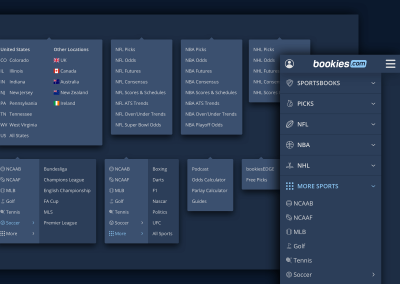
The perfect example is the sportsbooks Nav item. The image below shows two different groups – the United States and Other Locations. In that way, we can show the Sportsbooks State Pages for the US and the Sportbsbooks Country Page for other countries links available on one view. This would only work for now because we don’t have many US links.
On mobile, the Headline Dropdown is displayed as a single list, rather than in columns, but the headlines remain to give context and hierarchy.

Double Dropdown
The Double Dropdown is ideal for when we have too many items falling in one same group, when that specific group is a sub-nav item. This works well when we don’t need to display these sublinks in one view, so we can hide them.
The perfect example is the “More” and the “Soccer” sub-nav item inside the sports dropdown, as you can see in the images below. “More” and “Soccer” are less relevant to US users than the actual US main sports, so we can hide the MLS and the different European Football Leagues in “Soccer”, and a few other sports inside “More” on the desktop view.
The desktop and mobile views are quite different. On the desktop one, we hide these items and make them available once the user clicks to expand it into the Double Dropdown. However, on mobile, they will always be visible, but inside a box that visually looks like “inside that category”.
One important rule to define here is that the Double Dropdown will always expand to the right. That being said, we can never have a Double Dropdown item as the last item on the right side of the Navigation.
For example, on the desktop, if More Sports was the last item, the double dropdown would expand outside the site grid area, since we do not want the dropdown to expand to the left, so this has to be avoided as much as possible.
Another way to see this is: if that double dropdown will have to accommodate too many links, resulting in too many columns, it needs to be displayed in the nav with enough room to allow for that double dropdown expansion within the site grid area.
In the future, if the Sportsbooks item needs to accommodate every single state in the US, it will require to become a double dropdown (covered below in this page) and will need a lot of space to allow that Double Dropdown to expand to the right

At some point in the future, we may need to use the Double Dropdown to display all US states in it, but they are way too many.
The solution in place to accommodate all these links is showing all of them on desktop, but on mobile, we can display the main states first and have a “View More Option” as you can see in the images below.

Styling
The Gifs below show how the navigation was styled, according to the Bookies guidelines.


The static images show how the dropdowns looked on a side-by-side view.